What Workstation Is Required for Dynamic Digital Radiography?
A dynamic digital radiography workstation requires high-end multi-core processors, dedicated graphics cards, fast system memory, and high-speed storage drives. Standard office PCs fail under heavy workloads. High-frame-rate cine runs generate massive datasets. Radiologists need powerful hardware to review video loops without lagging. Upgrading IT infrastructure prevents review bottlenecks.
What Hardware Does a Dynamic Digital Radiography Workstation Need
Dynamic imaging demands robust internal components. Basic office computers lack sufficient processing power.
- Graphics Processing Unit (GPU): A dedicated GPU handles real-time rendering. It speeds up edge enhancement and noise reduction.
- System Memory (RAM): 32GB of RAM is the minimum baseline. Large RAM sizes load long cine runs instantly.
- Storage Speed: [NVMe solid-state drives] provide ultra-fast data retrieval speeds. They load massive multi-frame files in seconds.
How Much Storage Capacity Is Required for Dynamic Sequences
Dynamic digital radiography files are much larger than static X-ray images. A single cine acquisition contains dozens of individual frames.
Storage disks fill up quickly in busy departments. Hospitals must deploy scalable network attached storage. Efficient [JPEG 2000 compression] algorithms reduce file sizes. Compressed files save precious network bandwidth during PACS transfers.
How Do Display Requirements Affect Image Review
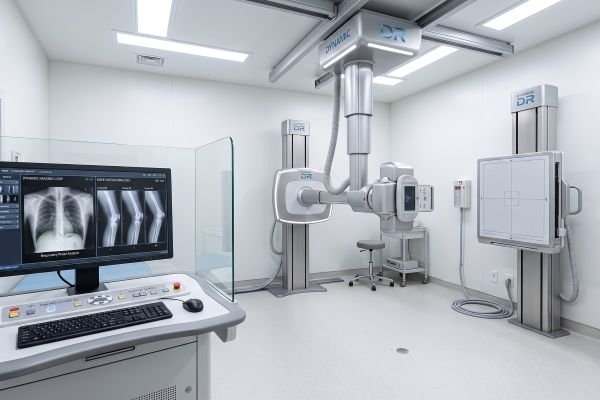
Radiologists analyze subtle anatomical motion frame by frame. Standard monitors cannot display these fine details.
Diagnostic review stations need calibrated grayscale monitors. High luminance levels reveal micro-fractures and soft tissue changes. Anti-glare coatings reduce eye strain during long shifts. Dual-monitor setups allow side-by-side comparison of different breathing phases.
How Does PACS and IT Integration Affect Workstation Performance
Workstations must connect smoothly to hospital networks. Network latency disrupts clinical workflows.
Consoles need full DICOM compatibility. Seamless PACS integration lets doctors pull prior exams instantly. Secure network protocols protect sensitive patient health data. IT teams must test bandwidth limits before deploying new hardware.
Hardware Specification Checklist
Use this quick hardware checklist before ordering new workstations:
| Hardware Component | Minimum Specification | Clinical Purpose |
|---|---|---|
| Processor (CPU) | Intel Core i7 / AMD Ryzen 7 | Powers real-time image rendering |
| Memory (RAM) | 32GB DDR4 or DDR5 | Handles large multi-frame datasets |
| Storage (SSD) | 1TB NVMe Solid-State Drive | Delivers instant file load speeds |
| Display Screens | 3MP Grayscale Medical Monitors | Ensures accurate diagnostic clarity |
Conclusion
Building a reliable dynamic digital radiography review workstation requires balanced processing power, fast storage, and high-grade medical displays. Proper hardware choices ensure smooth diagnostic workflows.
Are you planning an IT upgrade for your imaging department? Contact the SEEHO technical engineering team today to review your PACS setup and receive a tailored workstation configuration list for your dynamic digital radiography project.