Common Flat Panel Detector Problems and Troubleshooting
Flat Panel Detectors (FPDs) are the core imaging components of modern Digital Radiography systems. They convert X-rays into digital images quickly and accurately, enabling efficient clinical diagnosis. Although FPDs are designed for long-term reliability, they may experience performance issues due to daily use, environmental conditions, or improper handling.
Common Flat Panel Detector problems include image artifacts, communication failures, calibration errors, battery issues, and physical damage. Understanding these problems and applying basic troubleshooting methods can help maintain image quality, reduce system downtime, and extend the detector’s service life.
Flat Panel Detector Image Artifacts Affect Diagnostic Quality
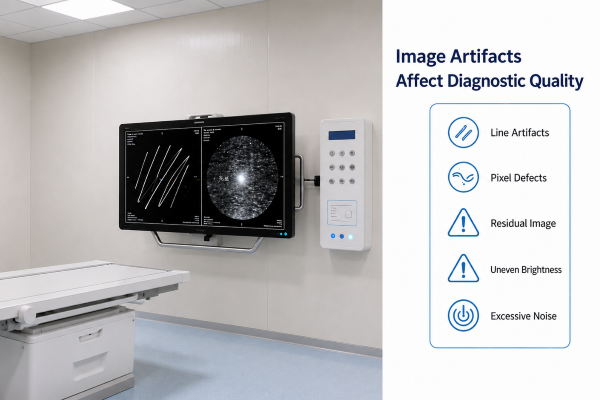
Image artifacts are among the most common Flat Panel Detector problems. They can interfere with diagnostic accuracy and may require repeat examinations if not addressed promptly.
Common image artifacts include:
- Vertical or horizontal lines
- Dead or bright pixels
- Ghost images
- Non-uniform brightness
- Excessive image noise
These issues may result from detector contamination, calibration errors, hardware aging, or exposure to excessive mechanical stress. In some cases, incorrect imaging parameters or software settings may also contribute to image artifacts.
Basic troubleshooting steps include inspecting the detector surface, verifying calibration status, reviewing exposure settings, and restarting the imaging system. If artifacts persist after these checks, a more detailed technical inspection may be required.
Regular quality control procedures help identify image quality problems before they affect routine clinical examinations.
Flat Panel Detector Communication and Connection Issues
Reliable communication between the Flat Panel Detector and the Digital Radiography System is essential for smooth clinical workflows. Connection problems may interrupt image transmission, delay examinations, or prevent the detector from being recognized by the system.
Common communication issues include:
- Wireless connection failure
- Ethernet cable disconnection
- Detector not detected by the workstation
- Slow image transfer
- Unstable network communication
Many communication problems are caused by weak wireless signals, damaged cables, incorrect network settings, outdated firmware, or low battery levels in wireless detectors.
Troubleshooting usually begins by checking the detector’s connection status, confirming network settings, inspecting cables, and restarting both the detector and workstation. Updating system software and firmware may also resolve compatibility-related communication issues.
Maintaining stable network connectivity and following the manufacturer’s recommended configuration can significantly reduce communication failures.
Flat Panel Detector Calibration Errors Reduce Imaging Accuracy
Calibration plays a critical role in maintaining consistent image quality and accurate detector performance. Over time, changes in detector sensitivity or environmental conditions may affect imaging consistency, making periodic calibration necessary.
Common calibration-related issues include:
- Non-uniform image brightness
- Increased background noise
- Reduced detector sensitivity
- Exposure inconsistencies
- Calibration warning messages
Many Digital Radiography Systems include built-in calibration tools that simplify routine detector calibration. Following the manufacturer’s recommended calibration schedule helps maintain image uniformity and minimizes the risk of diagnostic errors.
If calibration problems continue after routine recalibration, the detector may require professional evaluation to determine whether hardware components or internal electronics need further inspection.
Physical Damage and Handling Problems
Flat Panel Detectors are precision imaging devices that require careful handling during daily clinical use. Accidental drops, excessive pressure, or improper storage can damage internal components and affect imaging performance.
Common physical problems include:
- Cracked detector housing
- Scratched detector surface
- Internal impact damage
- Liquid contamination
- Dust entering connector ports
Many of these issues can be prevented through proper operating procedures. Healthcare professionals should always carry the detector with both hands, avoid placing heavy objects on its surface, and store it in a clean, dry environment when not in use.
Routine visual inspections can help identify signs of physical wear before they develop into more serious equipment failures.
Battery and Power Supply Issues
Wireless Flat Panel Detectors rely on stable battery performance to ensure uninterrupted imaging. Proper battery management also helps maximize Flat Panel Detector reliability and service life.
Common battery-related issues include:
- Short battery life
- Failure to charge
- Unexpected power shutdown
- Slow charging performance
- Battery overheating
Basic troubleshooting includes checking battery connections, using the recommended charger, verifying charging indicators, and replacing aging batteries when necessary.
Healthcare facilities should also maintain spare batteries and follow the manufacturer’s charging recommendations to keep each Flat Panel Detector operating efficiently during busy clinical schedules.
Software Compatibility and System Integration Problems
Modern Flat Panel Detectors work closely with image acquisition software, workstations, and hospital information systems. Proper software compatibility is essential for reliable Flat Panel Detector performance.
Common software-related problems include:
- Driver conflicts
- Firmware incompatibility
- Image acquisition software errors
- Delayed image display
- Integration issues with hospital information systems
Routine software updates help maintain compatibility between the detector, workstation, and Digital Radiography System. Before installing new software versions, healthcare facilities should verify compatibility with existing hardware and clinical workflows.
Maintaining updated software also improves cybersecurity, enhances Flat Panel Detector stability, and supports long-term operational reliability.
Flat Panel Detector Preventive Maintenance Reduces Detector Failures
Preventive maintenance is the most effective way to reduce Flat Panel Detector failures and maintain consistent imaging performance. A structured maintenance program helps identify potential issues before they affect clinical operations.
Recommended preventive maintenance practices include:
- Cleaning the detector according to manufacturer guidelines
- Performing routine calibration checks
- Inspecting cables, connectors, and battery condition
- Monitoring image quality regularly
- Recording maintenance and service history
- Providing operator training on proper detector handling
Combining preventive maintenance with regular quality control inspections helps keep every Flat Panel Detector operating at its best while reducing unexpected downtime.
Conclusion
Although Flat Panel Detectors are designed for reliable long-term performance, issues such as image artifacts, communication failures, calibration errors, battery problems, and physical damage may occur during routine clinical use. Understanding these common problems and applying appropriate troubleshooting methods can help maintain image quality, improve workflow efficiency, and reduce unnecessary equipment downtime.
Routine inspection, proper handling, timely software updates, and preventive maintenance are all essential for maximizing detector performance and extending service life. By establishing effective maintenance practices, healthcare facilities can ensure more stable imaging operations and support consistent diagnostic quality.
Reliable imaging performance is fundamental to efficient clinical workflows and accurate diagnosis. Our Digital Radiography solutions are designed to provide dependable performance, long-term stability, and lasting durability for modern healthcare environments. Contact us today to discuss your imaging needs and discover how our technical expertise and trusted technology can help optimize your clinical workflow.